Introduction
One of the features C# has gained in it’s latest V4 incarnation is the ability to work with optional parameters. Now VB.Net (and the underlying IL) has had this ability for sometime, but as it’s new to C# folks, and causing a little confusion; I’m going to attempt to explain how it works, when it works and the potential gotchas. I’ll also cover a strange inconsistency between the the VB and C# compilers when it comes to named parameters.
Warning: This post contains IL, but don’t let that put you off – you don’t actually need to understand it to get the point of the post!
So It’s C#4 Only, Right?
Sort of 🙂 Just to confuse things, optional parameters, from both a definition and consumption perspective, are really the concern of the compiler. As other posts have correctly pointed out, as long as you’re using Visual Studio 2010 you can define and consume optional parameters while targeting an older framework version:
public void DoThings(int intParameter = 22, string stringParameter = "Default")
{
    // Do things
}

// ...

DoThings(); // Uses the default values
This will work whether you’re in the same assembly, or consuming a library that already exposes methods with optional parameters.
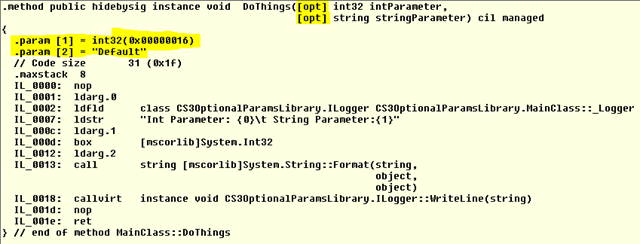
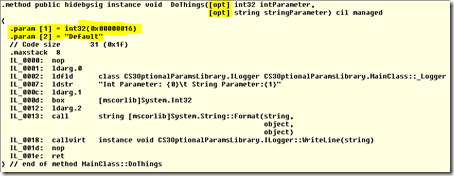
You can also happily consume C# libraries containing optional parameters with VB.Net; even if the VB.Net project is still running under VS2008. The reason this works it that the IL that the new C# compiler is emitting is nothing new, and VB.Net has been able to define and consume optional parameters for some time. You can see the IL that is generated for the above method in the ILDASM output below (interesting parts highlighted in yellow):
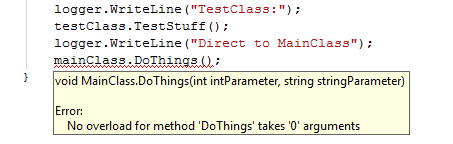
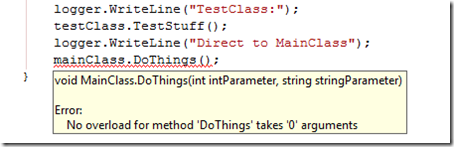
The one thing you *cannot* do is consume optional parameters using C# in Visual Studio 2008; even if you’ve built the library in VS2010 and targeted the older framework. The C#3 compiler just doesn’t understand (or more to the point doesn’t care about) optional parameters. If you try and build the code above using Visual Studio 2008 you will get the following error:
Definitely something for library authors to consider – we’re not quite out of “overload hell” yet unfortunately.
Gotchas?
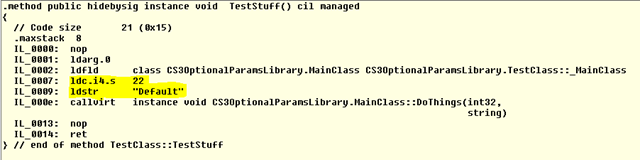
Now you may well think that when you consume an optional parameter, the compiler is emitting code that pulls the default value from the method information at runtime – but that isn’t the case. In a similar fashion to the way the compiler handles consuming consts, the default values are “baked into” the calling code. This is true whether the calling code is in the same assembly as the definition, or a separate assembly . The following ILDASM screenshot shows the IL generated for the DoThings() call above (interesting parts highlighted in yellow again):
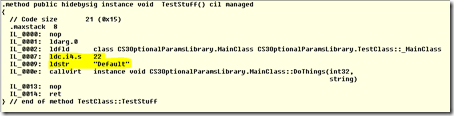
Even if you don’t fully understand the IL you can clearly see the constant values in the code are “baked into” the TestStuff() method.
The issue this can cause is the same for exposing public consts – if you change the default values in a library, but don’t recompile the calling code, then the calling code will still call your method(s) with the old default values. This is definitely something you need to consider when designing APIs using optional parameters.
One potential way to “work around” this issue and avoid “locking yourself in” to a particular set of defaults would be to follow the following pattern:
public void DoThings(int? intParameter = null, string stringParameter = null)
{
    if (intParameter == null)
        intParameter = 22;

    if (stringParameter == null)
        stringParameter = "Default";

    // Do Stuff
}
In the code above we still get the benefits of having optional parameters; but because we use “marker” values for defaults (nulls in this case), and set the *real* defaults inside the method, we are free to change the real defaults at a later date. This technique does require more code, and doesn’t look quite as elegant as the previous example, but in my opinion the benefits outweigh the drawbacks, especially for public APIs.
A VB/C# Named Parameters Quirk
As I was pulling together the IL for this post I discovered a small “quirk” when comparing the IL output by the VB.Net compiler to the output of the C’# compiler when dealing with named parameters. If we call the DoThings() method above and specify just the stringParameter the IL produced by the VB.Net compiler looks as I would expect:

The default value for the intParameter is pushed onto the stack, followed by our “Nondefault” string value and the method is called. The IL produced by the C# compiler is slightly different though, as shown by the highlighted sections below:

In the C# version the “Nondefault” string is pushed onto the stack *first*, then pops it off into a local variable (stloc.3), the default value for intParameter is then pushed, followed by the contents of the local variable (ldloc.3).
Not a massive difference, and I’m sure there’s a good reason for it, but the C# version does look decidedly “odd” to me. I’m no expert in IL performance, but this may be conclusive proof that VB is faster than C# 😉 *
Update: Marc Gravell was kind enough to review this post for me and correctly pointed out that I should really be comparing IL for *optimised* builds, not debug builds (which have optimisation turned off). Marc has done this for himself and confirmed the stloc and ldloc are still present, so my point is still valid (*phew*)
* Note: This is a joke.. I got some abuse on Twitter for “VB bashing” recently, hopefully this will appease the VB heads! 🙂